Govern AI Assistants in RStudio and Positron: Posit Workbench 2026.10


TL;DR
- Posit Assistant is generally available: Your data scientists get an AI agent in the RStudio Pro and Positron Pro sessions they already use, with no new tool to roll out.
- AI governance controls (Preview): Administrators approve LLM providers, models, and Assistant settings by group or user in Workbench profiles, which security reviewers can read before they sign off.
- Admin-managed Assistant versions (Preview): IT chooses which Assistant version RStudio Pro runs, so each new release can pass change approval first and roll back if needed.
- Agent Activity (Preview): Each user sees their own agent usage and estimated cost across Claude Code, Codex, and Posit Assistant, and can choose models with cost in mind.
- Predictable operations: Level-based profile precedence, approved Kubernetes images (Preview), and OpenTelemetry export to several endpoints help platform teams apply policy as written and send logs where security needs them.
Posit Workbench 2026.10.0 (“Blue Mistflower”) makes Posit Assistant generally available in RStudio Pro and Positron Pro sessions, and adds Preview controls that let administrators decide which AI providers, models, and Assistant versions their users run.
AI agents are already running in most organizations. The open question for IT and data leaders is whether those agents run somewhere the organization can govern. In enterprise data science, the distance between "this looks useful" and "we can use this" is filled with security reviews, provider approvals, and the need to control upgrades, data access, and telemetry.
Posit Workbench 2026.10.0 helps your organization approve AI agents for data science work, using the same profiles your administrators use today to manage sessions and compute.
- For IT and security teams: You set which LLM providers, models, and Posit Assistant settings each group or user can use, and users cannot override those choices. Your security reviewers can read that policy in configuration files before they approve AI for a team. You also choose which Posit Assistant version RStudio Pro sessions run, so you can test a new version or roll back to an earlier one on your own schedule. These controls are in Preview.
- For data science leaders: Your team works with an AI agent inside the RStudio and Positron sessions it uses today, so adopting AI adds no new tool for you to roll out or support. In Agent Activity (Preview), each person can see their own agent usage and estimated cost across Claude Code, Codex, and Posit Assistant, and choose models and tools with cost in mind.
For data scientists: Posit Assistant, now generally available, understands your session, data, code, and visualizations. Its suggestions fit the analysis in front of you, and you control what it runs. For AWS Bedrock, Snowflake Cortex, and Microsoft Foundry, Workbench manages the credentials, so you connect without creating or pasting API keys.
Want to see how these controls fit your environment? Talk to one of our experts.
What's new in Posit Workbench 2026.10.0
| Capability | Release state (Oct ‘26) | License tiers |
| Posit Assistant | Generally available | All tiers |
| AI governance controls | Preview | Enhanced, Advanced |
| Agent Activity | Preview | Enhanced, Advanced |
| Admin-managed Posit Assistant versions (RStudio Pro) | Preview | All |
| Homepage notifications | Available | All |
| Explicit profile precedence | Opt-in setting | All |
| Kubernetes image restrictions | Preview | Advanced |
| OpenTelemetry to multiple OTLP endpoints | Available | Enhanced, Advanced |
Posit Assistant is generally available
Available in all license tiers for RStudio Pro and Positron Pro sessions.
Posit Assistant, now generally available in RStudio Pro and Positron Pro sessions on Posit Workbench, is a data science agent that understands your session, your data, your code, and your visualizations. It works under your supervision: it proposes and runs code, and you control what it does.
On Workbench, Posit Assistant runs inside your sessions and connects to the AI providers your organization has approved so users don’t have to manually handle API keys.
Positron 2026.10 also adds a preview of Assistant driving Positron itself: running and previewing apps, browsing Data Connections, setting up interpreters, and publishing to Posit Connect. Read more in Assistant drives Positron and the Positron 2026.10 release post, or get started at assistant.posit.co.
AI governance controls for Posit Assistant
Available in Preview for Enhanced and Advanced license tiers.
Posit Workbench 2026.10.0 adds Preview controls that let administrators set policy for AI coding assistants: enable or disable Posit Assistant, enforce its settings, and allowlist the LLM providers and models users can reach, scoped globally, by group, or by user.
The principle comes from How Posit Team governs AI for enterprise data science and research: apply the controls you already use for human work to AI assistants and agents.
Administrators set policy in /etc/rstudio/profiles, scoped globally, by group, or by user, and apply changes with sudo rstudio-server reload.
- Enable or disable Assistant with assistant-enabled. When it is off, users can't turn it back on.
- Enforce or default Assistant settings with assistant-settings-enforced and assistant-settings-default, using the same JSON schema as Assistant's own settings file. Enforced settings act as a ceiling: users can restrict them further but can't loosen them.
- Allowlist LLM providers and models with ai-providers-enforced and ai-providers-default, so users only reach the providers and models your organization has approved.
- No long-lived LLM Provider API tokens with Workbench-managed credentials for AWS Bedrock, Snowflake Cortex, and Microsoft Foundry.
Learn more in the Admin Guide: Posit Assistant admin controls and AI provider admin controls.
Agent Activity: see your AI coding-agent usage and estimated cost
Available in Preview for Enhanced and Advanced license tiers.
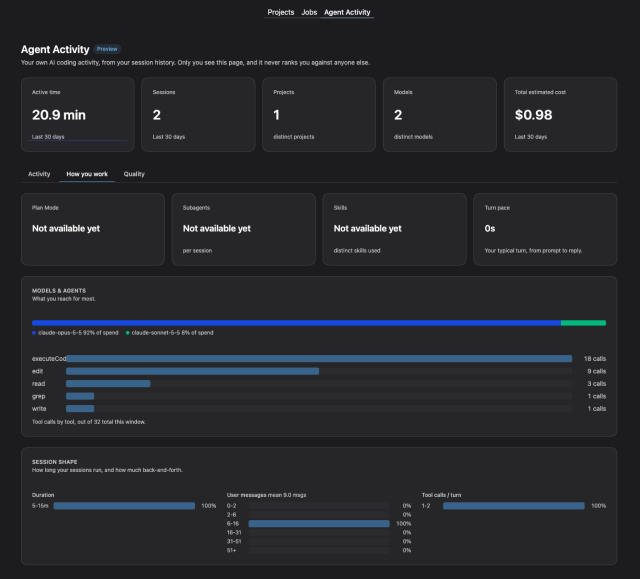
Agent Activity is a Preview page on the Posit Workbench homepage that shows each user their own AI coding-agent sessions, usage, and estimated costs across Claude Code, Codex, and Posit Assistant. Until now, users had no easy way to see their own usage, or what it costs, across projects, sessions, and agent harnesses.
Agent Activity is built on AgentsView and shows each user only their own data. Users get Activity, How you work, and Quality views covering sessions, active time, models, tools, plan-mode and subagent use, cache efficiency, and estimated cost.
Agent Activity helps each user understand their own usage. It doesn't aggregate usage or audit logs for administrator review. Admin-level views for auditing and token use across users, apps and sessions in Workbench and Connect are on our roadmap as part of the upcoming Posit LLM Gateway.
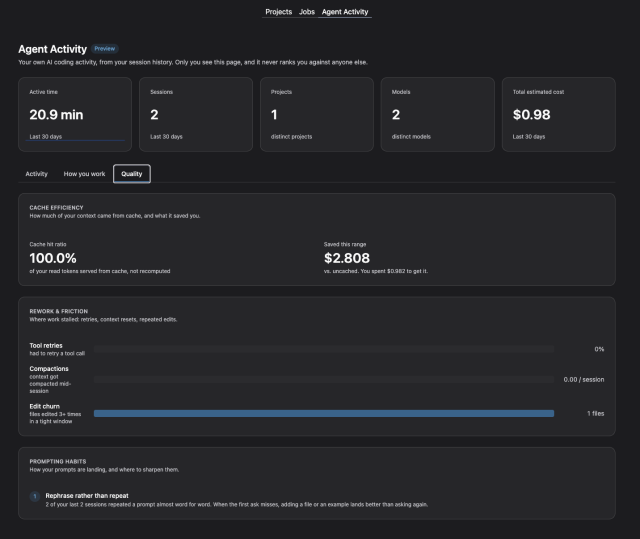
For more information, see the Agent Activity documentation.
Admin-managed Posit Assistant versions for RStudio Pro
Available in Preview for all license tiers.
Administrators told us they need to decide which version of Posit Assistant their users run, and to update it on their own schedule, independent of Workbench upgrades. A new command does this for RStudio Pro sessions:
sudo rstudio-server upgrade posit-assistantAdmins can install the version Posit offers for their release, install a specific --version, or install from a local file with --file and --sha256 for air-gapped environments. list, list-available, and cleanup show and tidy installed versions, and select <slot> or select --bundled chooses which installed copy is the admin's selection. Workbench upgrades no longer change that selection, and new sessions pick up a new selection without a Workbench restart.
You choose how much control to take:
- User-managed (default): Workbench runs the newest compatible copy among the admin's selection, the bundled copy, and the user's own copy. Users can upgrade when a new version of Posit Assistant is released.
- Admin-managed: set assistant-installation-enabled=0 and the admin's choice is binding. Update checks and the in-IDE install UI are turned off
Each Assistant version now installs into its own directory, so updating no longer requires closing other sessions, and a stale per-user copy no longer hides a newer bundled version.
Upgrade note: the posit-assistant-path session option is now ignored, and /etc/rstudio/pai is no longer read. If you used either, reinstall your version with the new command and remove the option from rsession.conf.
See Upgrading Posit Assistant for RStudio Pro.
Administration, governance, and observability
Homepage notifications
Available in all license tiers.
Admins need to warn users about maintenance, upgrades, planned downtime, or node scale-downs, but previously notifications only reached people who were already inside an RStudio session. A new admin API endpoint shows banner notifications to everyone who lands on the Workbench homepage, with no container restart or CLI access required.
Separately, homepage tooltips on a failed session now show the reason reported by the Job Launcher, such as an out-of-memory eviction, so users can see why their session ended.
See the Workbench API documentation.
Explicit profile precedence
Opt-in setting, available in all license tiers.
Over the past year we have been investing more in Workbench Profiles, which are global, per user or per-group settings for teams that map to compute and other configuration, and admins expect profiles to resolve the same way everywhere. Until now, /etc/rstudio/profiles used file order, so a [*] section added at the bottom could silently cancel every user and group override above it.
The new opt-in setting profiles-level-precedence-enabled=1 in rserver.conf resolves profiles the way Job Launcher profiles resolve: [username] overrides [@group], which overrides [*]. Without it, behavior is unchanged, and Workbench now logs a warning when a broader section sits below a narrower one. We expect level-based precedence to become the default in a future release.
Kubernetes: restrict which images users can launch
Available in Preview for Advanced license tier.
Admins want to offer an image picker without letting users run arbitrary images. The new container-repositories profile setting limits which registry repositories a user, group, or everyone can see and launch images from. Workbench enforces it when a session is submitted, not just when the list is displayed, and it works on registries such as GitHub Container Registry, Docker Hub, and Quay without rebuilding images to add labels.
Entries in repository-list also accept an optional ::Display Name suffix, and Workbench groups that repository's images under that name in the New Session dialog. You can also now choose per cluster whether new sessions start from a user's last-used image or the admin default.
See the Kubernetes plugin documentation.
OpenTelemetry to multiple OTLP endpoints
Available in Enhanced and Advanced license tiers.
Workbench can now export OpenTelemetry logs and traces to several destinations at once, as part of our ongoing work to increase Workbench’s native observability tooling. Teams no longer have to choose between Chronicle and another observability platform. Additional destinations go in a new /etc/rstudio/otel.conf, using [OTLPEndpoint "name"] sections (the same syntax as Posit Connect). Each endpoint can have its own headers, batch interval, and export timeout, and custom authentication headers can be encrypted with rstudio-server encrypt-password.
Upgrade notes:
- otel-logs-enabled and otel-traces-enabled now default to the value of otel-enabled, so a deployment that only set otel-enabled=1 will start exporting both signals. Set either option to 0 to export only one.
- If both otel-endpoint and otel-logs-endpoint are set in rserver.conf, logs now go to otel-logs-endpoint, along with the credentials in otel-logs-headers. Check that collector before you upgrade.
- Configuring endpoints in rserver.conf is deprecated but still works.
We also fixed trace export when only traces were enabled, and made session.launch traces complete in load-balanced deployments. See the OpenTelemetry documentation.
New for data scientists in RStudio and Positron
RStudio IDE
Available in all license tiers.
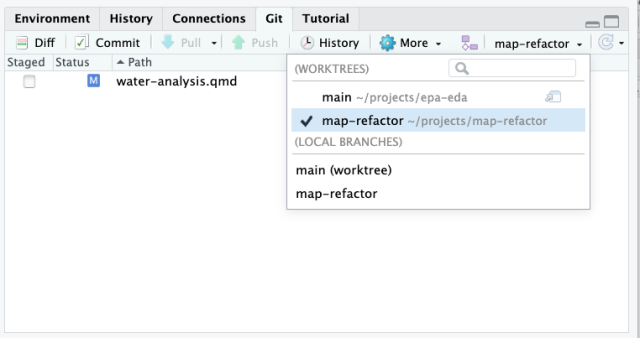
RStudio 2026.10.0 catches more R mistakes before you run your code, and makes it easier to work across Git branches and export plots at print resolution:
- Git worktrees. The Git pane's branch menu now lists worktrees. Open them as projects, create new ones, and remove them when you're done. More version control UI improvements are on the horizon as well.
- Fixed-size plots. Draw plots at a fixed size instead of the Plots pane size, and export bitmaps at up to 600 DPI.
- Data viewer. Hide and show columns from the summary panel.
- More R diagnostics. New checks catch look-alike and invisible characters, library() calls for packages that aren't installed, accidental assignments like if (x<-1), repeated arguments, and more.
- Terminal. Ctrl/Cmd+Click file paths to open them in the editor.
- And more: an active tab highlight, Show Hidden Objects in the Environment pane, a Tutorial pane filter, a Markdown outline, faster desktop startup, and smaller installs.
Positron Pro and VS Code sessions
Available in all license tiers for Positron Pro sessions.
Positron 2026.10 has its own release post, so here are the highlights most relevant to Workbench. Assistant can drive Positron (Preview), Positron can host your own coding agent through a built-in MCP server (experimental), and Data Connections is on by default, with Snowflake and Databricks connections able to use Workbench-managed credentials. For the full list, read the Positron 2026.10 release post and the Positron release notes.
On the Workbench side, "Use Positron preview" now appears in the New Session dialog on Kubernetes when session-use-file-storage=0 is set. An optional host key in snowflake.conf is written to connections.toml for endpoints that can't be derived from the account, such as restricted caller's rights.
Quality of life and infrastructure improvements
Added
- The pwb_sessions Prometheus metric gains a session_host label.
Stronger protection for stored AWS credentials. - Job Launcher 2.29: Kubernetes watches now reconnect with backoff after rate-limit (HTTP 429) responses, and the address option accepts IPv6 literals such as [::1].
Fixed
- Databricks sign-in with stale tokens.
Workbench failing to start as non-root with empty storage on /var/lib/rstudio-server. - Users provisioned through JIT/SCIM being unable to sign in or launch sessions for up to 30 seconds after provisioning was enabled.
See the full list in the release notes.
Dependencies
- Positron 2026.10.0-297
- Posit Assistant for RStudio 1.7.0
- AgentsView 0.38.1
- PWB Code Server 2026.10-b3210 (Code OSS 1.134.0)
- Copilot Language Server 1.551.2
- Electron 43.7.7
- Node.js 24.21.0 (GitHub Copilot, Posit Assistant)
- Job Launcher 2.29.0
- rserver-openid 0.9.1
- rserver-saml 0.9.3
Frequently asked questions
Is Posit Assistant generally available in Posit Workbench?
Yes. As of Posit Workbench 2026.10.0, Posit Assistant is generally available in RStudio Pro and Positron Pro sessions, in all license tiers.
How do administrators control which AI providers and models Workbench users can access?
Administrators set ai-providers-enforced and ai-providers-default in /etc/rstudio/profiles, scoped globally, by group, or by user. These controls are in Preview for the Enhanced and Advanced license tiers.
Can administrators turn off Posit Assistant for some users?
Yes. The assistant-enabled setting in /etc/rstudio/profiles turns Posit Assistant off globally, by group, or by user, and users cannot turn it back on. This control is in Preview for the Enhanced and Advanced license tiers.
Which LLM providers can Posit Assistant use with Workbench-managed credentials?
AWS Bedrock, Snowflake Cortex, and Microsoft Foundry, so users do not handle long-lived API keys. Posit Assistant also supports many other model providers.
Can administrators choose which version of Posit Assistant runs in RStudio Pro?
Yes, in Preview for all license tiers. The sudo rstudio-server upgrade posit-assistant command installs and selects versions, and setting assistant-installation-enabled=0 makes the administrator’s choice binding.
Learn more
There's a lot more in this release. You can read about all the features and bug fixes in the Posit Workbench and RStudio 2026.10.0 "Blue Mistflower" release in the RStudio/Posit Workbench Release Notes or the Positron release notes.
We'd love to hear your feedback about the new release on our community forum.
Interested in governing AI in your organization? Start a conversation with us.
To be notified of product updates, patches, and more, please subscribe to the Products emails.

Tom Mock
Related Content

Posit is now a CVE Numbering Authority

Posit AI is now Posit AI Pass
